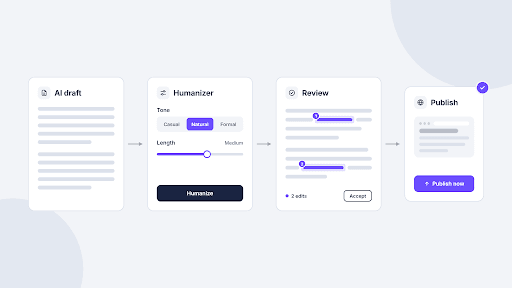
The best AI humanizer for web content is the one that changes how a draft reads without changing what it says. If you need a specific tone, Humanize Max gives you four styles and three lengths in one run. If you already work in QuillBot or Grammarly, their humanizers fit the account you have. GPTinf, Humanize AI and Undetectable AI put an AI check next to the rewrite, and Ahrefs gives you quick variants of a short passage.
To compare them on equal terms, we ran the same 103-word AI-written release note through each tool in November 2026. It contains a product name, two image formats, a settings path and the word “must”, so it shows whether a tool keeps the details a reader acts on. We also checked every feature, limit and price on the vendor’s own pages on the same day.
| Tool | Styles | Length control | Word limit | Free plan | Sign-up needed |
|---|---|---|---|---|---|
| Humanize Max | 4: Academic, Casual, Creative, Formal | Shorten, Standard, Expand | 2,000 words per run | Plans not yet published | No |
| QuillBot | Basic and Advanced modes | No | 125 words per run (free Basic mode); none on Premium | Basic mode | Yes, a free account |
| GPTinf | Standard, Academic, plus Custom Style | No | 300 words per request on the free plan | Yes | No |
| Grammarly | 4 preset styles and a custom voice (free account) | No | 1,500 words per run (basic tool) | Basic humanizer | No for the basic tool |
| Humanize AI | Free tone and Custom style; 6 more tones with a free account | Expand and Shorten (free account) | 200 words per run without an account, 400 with one | Yes | No |
| Undetectable AI | None | No | 1,000 words in total without an account | Yes | No |
| Ahrefs AI Humanizer | None; 1, 3 or 5 variants per run | No | 2,048 characters per run | Yes | No, in our test |
6 criteria for choosing a humanizer for web content
A humanizer earns its place only if its output needs fewer fixes than the draft you started with, and these six checks show whether a tool will do that for your content.
- Meaning stays intact. Facts, numbers and instructions should come out exactly as they went in. A rewrite that turns “must” into “should” changes what your page tells people to do, however natural it sounds.
- Tone and style control. Presets such as Formal or Casual let one tool handle both a landing page and a tutorial, while a tool with a single output voice suits only one of those jobs.
- Technical terms. Product names, file formats, UI paths and CLI flags need to come through untouched. Term locking is rare (QuillBot offers it on Premium), so a view that highlights every change is the practical safety net.
- Word limits. Entry-level limits in this list range from 125 to 2,000 words, counted per run, per request or as a total allowance. Ahrefs counts characters instead, so check the unit before you paste a full article.
- Free use and sign-up. Some tools run without an account, while others ask you to sign up before the first result or keep extra modes behind a free account. For a one-paragraph fix, that matters more than the paid price.
- Privacy of pasted text. Everything you paste is sent to the vendor’s servers. Check whether the tool says it stores or trains on input, and if it doesn’t say, keep unreleased features, client names and credentials out of the text.
The 7 best AI humanizer tools for developers and content teams
1. Humanize Max: best for setting tone and length together
Humanize Max is a single-purpose humanizer: you paste an AI draft, upload a file or load the built-in sample, choose a style and a length, and get a rewritten version in a few seconds. The four styles are Academic, Casual, Creative and Formal, and the three lengths are Shorten, Standard and Expand, so you can turn a stiff feature description into casual blog copy and trim it in the same run.
The result highlights every phrase it changed, which makes it quick to check whether a product name or a settings path came through. If the rewrite doesn’t land, Run it again produces a different version of the whole text. At the time of writing, it takes up to 2,000 words per run and works without an account.
Pros
- Four styles and three lengths, set independently
- Changed phrases highlighted in the result
- File upload, and no account needed to run it
Cons
- No AI detector or plagiarism checker
- Plans and limits aren’t published yet
Pricing: Plans and limits are still being finalized, so check the site for current terms.
Best for: Rewriting AI drafts of blog posts, product pages and emails into a specific tone.
2. QuillBot AI Humanizer: best for short edits inside the QuillBot suite
QuillBot’s AI Humanizer sits next to its paraphraser, grammar checker and AI detector, which makes it a natural pick if you already use QuillBot for rewording. Basic mode is free for up to 125 words per run, while Advanced mode, which rewrites more deeply, comes with Premium (the pricing page also lists three Advanced uses on the free plan). In our test, it asked us to create a free account before it showed the first result.
Premium removes the word limit and adds Freeze words, which keeps the terms you choose unchanged, along with tone insights, a history of past runs and a Chrome extension that humanizes text inside ChatGPT and Gemini.
Pros
- Freeze words on Premium keeps product names and keywords as written
- Works alongside QuillBot’s paraphraser, grammar checker and detector
- Five languages, including US, UK, Australian and Canadian English
Cons
- Free Basic mode stops at 125 words per run
- A free account is required before the first result
- No style presets or length control
Pricing: Basic mode is free. Premium is listed at $8.33 a month, billed annually.
Best for: Quick fixes to a paragraph or two for writers who already use QuillBot.
3. GPTinf: best for rewriting and checking in one place
GPTinf is a writing toolkit built around its humanizer, with an AI detector, plagiarism checker, grammar checker, paraphraser and readability checker on the same site. The humanizer has two modes, Standard and Academic, and takes pasted text or a PDF, Word or plain-text file. File-to-File mode returns the humanized document in its original format, so a long brief keeps its layout.
Custom Style lets you paste 150 to 1,200 words of your own writing, and later runs are shaped to match it, with no account needed. After each run, an AI-likelihood estimate appears under the output, so you can see whether a draft needs another pass. Treat that number as a probability, not proof of who wrote the text.
Pros
- Humanizer, AI detector, plagiarism and grammar checks in one place
- Custom Style matches your own writing samples
- File-to-File keeps the original document format
Cons
- Two modes only, with no length control
- Free use is capped at 300 words per request and 5 runs a day without an account (10 with a free one)
Pricing: A free plan is available. Paid plans start at $9.99 a month for Lite (5,000 words), with Pro at $24.99 and Unlimited at $59.99.
Best for: Freelancers and content teams that want to rewrite and check drafts without switching tools.
4. Grammarly AI Humanizer: best for teams already writing in Grammarly
Grammarly’s AI Humanizer comes in two layers. The tool on its web page is free, works without an account and offers basic humanization of pasted text or an uploaded document. A free Grammarly account adds the Humanizer agent, with four preset styles, a custom voice built from a writing sample, and support for English, Spanish, French, German, Portuguese and Italian.
Grammarly says the humanizer focuses on clarity and readability rather than on AI detectors, which matches how most web teams use these tools. If you need to show how a piece was written, Grammarly Authorship shows which parts came from AI, which came from online sources and which you wrote yourself. The basic tool’s word counter allows up to 1,500 words per run.
Pros
- Basic version works without an account
- Four styles and a custom voice with a free account
- Six languages
Cons
- No length control
- The full Humanizer experience requires Pro
Pricing: The basic humanizer is free. Grammarly Pro is listed at $12 on the plans page, which doesn’t state the billing period.
Best for: Teams that already write in Grammarly and want one voice across documents.
5. Humanize AI: best for fine control and API access
Humanize AI is built for people who want to tune the output. Without an account you get the Free tone, a Rewrite level slider with three stops (Quality, Balanced and Max) and Custom style, which learns your voice from 150 to 1,200 words of samples. A free account opens eight more modes, including Formal, Informal, Academic, Expand and Shorten, and on desktop a Writing level menu sets how plain or dense the result reads.
View changes highlights every edit, and File-to-File accepts PDF, DOCX, TXT and MD documents and returns them in the same format. Paid plans also include a public API that supports the same styles and rewrite levels as the web app, so a developer can add a humanizing step to a CMS or publishing pipeline.
Pros
- Many modes, plus rewrite level and writing level settings
- View changes and File-to-File
- Public API included with every paid plan
Cons
- Free runs stop at 200 words without an account (400 with one)
- The Lite plan processes up to 500 words at a time
Pricing: Paid plans start at $9.99 a month for Lite (10,000 words), with Standard at $19.99 and Unlimited at $59.99. Yearly billing lowers the monthly price.
Best for: Teams that need precise tone control or want to humanize text through an API.
6. Undetectable AI: best for testing a full-length draft without an account
Undetectable AI keeps its humanizer simple: one text box, one button and no style or length settings. Its free allowance works differently from the others, with 1,000 words in total before you need an account and another 1,000 once you create a free one.
Under the output, a Check for AI button runs a detection check on the result, and the same site has a separate AI detector and plagiarism checker. Its FAQ says pasted text isn’t published or shared but doesn’t say whether it’s stored, so keep confidential details out of the drafts you run through it.
Pros
- 1,000 words without an account
- One-click AI check on the output
- Plagiarism checker on the same site
Cons
- No style, tone or length controls for free account
Pricing: Paid plans start at $9.99 a month for Lite (5,000 words), with Pro at $25 (25,000 words) and Unlimited at $59 (1,000,000 words). Yearly billing lowers the monthly price.
Best for: Trying a humanizer on a full-length draft before you commit to an account.
7. Ahrefs AI Humanizer: best for quick variants of short copy
Ahrefs, best known for its SEO platform, offers a free AI Text Humanizer among its writing tools. You paste up to 2,048 characters, choose one, three or five variants, and pick the version that reads best. It ran without an account in our test.
Variants are the useful part. For a hero headline, a meta description or a product blurb, comparing three rewrites side by side is faster than prompting a chatbot three times, and you can export all results as a text file. The character limit, which fits a few short paragraphs, rules it out for full articles.
Pros
- Free, with no account needed in our test
- One, three or five variants per run
- Export all results as a text file
Cons
- 2,048 characters per run
- No tone, style or length control
Pricing: Free on Ahrefs’ website.
Best for: Short marketing copy where you want several options to choose from.
Which tool to use for 4 common web content tasks
The best AI humanizer tool for a documentation team isn’t the one a growth marketer needs, so match the tool to the content in front of you.
- Blog posts and tutorials drafted with AI. AI drafts open generically and build every paragraph the same way. Humanize Max in Casual style or Humanize AI’s Informal mode helps vary the rhythm, and keeping code blocks out of the input stops a rewrite from touching commands.
- Product and landing page copy. Keywords have to stay put, so short variants work better than a full rewrite. Use Ahrefs for headline and meta description options, Humanize Max with Shorten for a tighter version, or QuillBot Premium if you need Freeze words. For the keyword research behind the page, SitePoint’s roundup of top AI SEO tools covers the other half of the job.
- Documentation and release notes. Accuracy matters more than style, so pick a formal mode and a tool that shows its changes, such as Humanize AI or Humanize Max, work section by section, and diff the result against your source. SitePoint’s guide on how to humanize AI-written technical documentation walks through the process for READMEs, API references and changelogs.
- Marketing content that must sound like a person wrote it. Newsletters, social posts and emails need one voice, which is where Grammarly’s custom voice, GPTinf’s Custom Style and Humanize AI’s Custom style help. If you want an AI detector and humanizer in one place, GPTinf shows a score after each run and Undetectable AI checks the output in one click, so you can find passages that still read as generic.
FAQ
What is the best AI humanizer?
There isn’t one winner, because these tools solve different problems. The quickest way to decide is to run a paragraph from your own work, ideally one with a product name, a number and an instruction, through two or three of the tools above, and keep the one whose output you’d publish with the fewest fixes.
Does Google penalize humanized AI content?
Google’s guidance on using generative AI content is about value rather than the tool: mass-producing pages that add nothing for readers can count as scaled content abuse. A humanizer changes phrasing, not usefulness, so the same rules apply. Google also recommends fact-checking AI-generated titles, meta descriptions and image alt text before you publish.
Final thoughts: pick the humanizer that fits your content
The best humanizer for your team is the one whose controls match your content: tone presets for blog posts, variants for short copy, change highlighting for docs and a custom voice for marketing. Run one of your own paragraphs through two or three tools from this list, then read every highlighted change, especially names, numbers and words like “must”, before anything goes live.